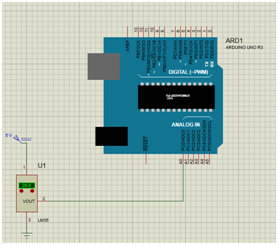
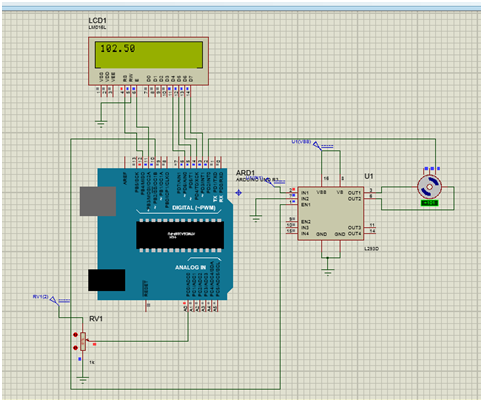
Código
// This sketch has been Refurbished by BUHOSOFT
// IMPORTANT: Adafruit_TFTLCD LIBRARY MUST BE SPECIFICALLY
// CONFIGURED FOR EITHER THE TFT SHIELD OR THE BREAKOUT BOARD.
// SEE RELEVANT COMMENTS IN Adafruit_TFTLCD.h FOR SETUP.
//#define DEBUG
#include <Adafruit_GFX.h>    // Core graphics library
#include <Adafruit_TFTLCD.h> // Hardware-specific library

float x;

// Pines de conexion del LCD
#define LCD_CS A3 // Chip Select - Pin analogico 3
#define LCD_CD A2 // Command/Data - Pin Analogico 2
#define LCD_WR A1 // LCD Write - Pin Analogico 1
#define LCD_RD A0 // LCD Read - Pin Analogico 0
#define LCD_RESET A4 // LCD Reset - Pin Analogico 4

Adafruit_TFTLCD tft(LCD_CS, LCD_CD, LCD_WR, LCD_RD, LCD_RESET); // Instancia del LCD

#define	BLACK   0x0000  // Definimos los colores para poder referirnos a ellos con su nombre
#define	RED     0xF800  // en lugar de usar el código hexadecimal de cada uno.
#define	GREEN   0x07E0
#define WHITE   0xFFFF
#define BLUE    0x001F
#define CYAN    0x07FF
#define YELLOW  0xFFE0
#define MAGENTA 0xF81F

uint16_t identifier = 0x9341;

void setup(void)
{
  tft.reset();

  tft.begin(identifier);

  tft.fillScreen(BLACK); // Colocamos el fondo del LCD en Negro
}


void loop(void)
{


   x =analogRead(8)*5.0/1023.0;


    tft.setRotation(0); // Establecemos la posición de la pantalla Vertical u Horizontal

    tft.setCursor(40, 10);  // Situamos el cursor en la posicion del LCD deseada,
                            // (X, Y) siendo X el ancho (240 px max.) e Y el alto (320 px max.)

    tft.setTextSize(6); // Definimos tamaño del texto. (Probado tamaños del 1 al 10)

    tft.setTextColor(CYAN); // Definimos el color del texto

    tft.println(x); // Escribimos nuestro texto en el LCD. Realizará un salto de linea
                          // automatico si el texto es mayor que el tamaño del LCD

                                                   // (Punto inicial X, Punto inicial Y, Longitud X,Longitud Y, Radio de los vertices, Color)
    delay(10000);
}

/* TFT Graphic functions

   BLACK   0x0000  // Color codes for background, text or filled circles, squares or triangles.
   RED     0xF800
   GREEN   0x07E0
   WHITE   0xFFFF
   BLUE    0x001F
   CYAN    0x07FF
   YELLOW  0xFFE0
   MAGENTA 0xF81F

 - tft.reset();                                     // Reset Screen
 - tft.begin(identifier);                           // Set LCD driver (identifier = 0x9325; 0x9328; 0x7575; 0x9341; 0x8357)
 - tft.width();                                     // Returns lcd width in pixels (240)
 - tft.height();                                    // Returns lcd height in pixels (320)
 - tft.setRotation(A);                              // Rotate screen (A = 0; 1; 2; 3;)
 - tft.fillScreen(color);                           // Set LCD Background color (See colour codes a few lines up)
 - tft.setCursor(X, Y);                             // Set cursor on lcd X, Y coordinates in pixels
 - tft.setTextSize(A);                              // Set text size (A = 1; 2; 3; 4; .... 100? )
 - tft.setTextColor(color);                         // Set text colour (see colour codes a few lines up)
 - tft.print("text");                               // Write on LCD some "text"
 - tft.println("text");                             // Write on LCD some "text" and set cursor on a new line
 - tft.drawLine(Xs, Ys, Xf, Yf, color);             // Draw a line (Start X coordinate, start Y coordinate, end X coordinate, end Y coordinate, color)
 - tft.drawRect(Xs, Ys, width, height, color);      // Draw a square/rectangle (Start X coordinate, start Y coordinate, Square width, square height, color)
 - tft.fillRect(Xs, Ys, width, height, color);      // Draw a filled square/rectangle (Start x coordinate, start Y coordinate, Square width, square height, color)
 - tft.drawCircle(Xs, Ys, Radius, color);           // Draw a circle (Start X coordinate, Start Y coordinate, circle radius, color)
 - tft.fillCircle(Xs, Ys, Radius, color);           // Draw a filled circle (Start X coordinate, Start Y coordinate, circle radius, color)
 - tft.drawTriangle(Xs, Ys, Xl, Yl, Xr, Yr, color); // Draw a triangle (Top vertex X coordinate, Top vertex Y coordinate, Bottom left vertex X coordinate,
                                                                        Bottom left vertex Y coordinate, Bottom right vertex X coordinate, Bottom right vertex Y coordinate, color)
 - tft.fillTriangle(Xs, Ys, Xl, Yl, Xr, Yr, color); // Draw a filled triangle (Top vertex X coordinate, Top vertex Y coordinate, Bottom left vertex X coordinate,
                                                                              Bottom left vertex Y coordinate, Bottom right vertex X coordinate, Bottom right vertex Y coordinate, color)
 - tft.drawRoundRect(20, 245, 130, 60, 15, RED);    // Draw a round corners square (Start X coordinate, start Y coordinate, Square width, square height, corners radius, color)
 - tft.fillRoundRect(40, 260, 90, 30, 10, GREEN);   // Draw a filled round corners square (Start X coordinate, start Y coordinate, Square width, square height, corners radius, color)
*/